-kcrzw.svg)
-shlgn.svg)

本文介绍的功能需要更新mod至最新版本
设置 init.c 文件
使用复活套装功能,需要修改init.c文件
如果不使用复活套装功能,可以不设置
这是原版代码:
void main()
{
	//INIT ECONOMY--------------------------------------
	Hive ce = CreateHive();
	if ( ce )
		ce.InitOffline();

	//DATE RESET AFTER ECONOMY INIT-------------------------
	int year, month, day, hour, minute;
	int reset_month = 9, reset_day = 20;
	GetGame().GetWorld().GetDate(year, month, day, hour, minute);

	if ((month == reset_month) && (day < reset_day))
	{
		GetGame().GetWorld().SetDate(year, reset_month, reset_day, hour, minute);
	}
	else
	{
		if ((month == reset_month + 1) && (day > reset_day))
		{
			GetGame().GetWorld().SetDate(year, reset_month, reset_day, hour, minute);
		}
		else
		{
			if ((month < reset_month) || (month > reset_month + 1))
			{
				GetGame().GetWorld().SetDate(year, reset_month, reset_day, hour, minute);
			}
		}
	}
}

class CustomMission: MissionServer
{
	void SetRandomHealth(EntityAI itemEnt)
	{
		if ( itemEnt )
		{
			float rndHlt = Math.RandomFloat( 0.45, 0.65 );
			itemEnt.SetHealth01( "", "", rndHlt );
		}
	}

	override PlayerBase CreateCharacter(PlayerIdentity identity, vector pos, ParamsReadContext ctx, string characterName)
	{
		Entity playerEnt;
		playerEnt = GetGame().CreatePlayer( identity, characterName, pos, 0, "NONE" );
		Class.CastTo( m_player, playerEnt );

		GetGame().SelectPlayer( identity, m_player );

		return m_player;
	}

	override void StartingEquipSetup(PlayerBase player, bool clothesChosen)
	{
		EntityAI itemClothing;
		EntityAI itemEnt;
		ItemBase itemBs;
		float rand;

		itemClothing = player.FindAttachmentBySlotName( "Body" );
		if ( itemClothing )
		{
			SetRandomHealth( itemClothing );

			itemEnt = itemClothing.GetInventory().CreateInInventory( "BandageDressing" );
			player.SetQuickBarEntityShortcut(itemEnt, 2);

			string chemlightArray[] = { "Chemlight_White", "Chemlight_Yellow", "Chemlight_Green", "Chemlight_Red" };
			int rndIndex = Math.RandomInt( 0, 4 );
			itemEnt = itemClothing.GetInventory().CreateInInventory( chemlightArray[rndIndex] );
			SetRandomHealth( itemEnt );
			player.SetQuickBarEntityShortcut(itemEnt, 1);

			rand = Math.RandomFloatInclusive( 0.0, 1.0 );
			if ( rand < 0.35 )
				itemEnt = player.GetInventory().CreateInInventory( "Apple" );
			else if ( rand > 0.65 )
				itemEnt = player.GetInventory().CreateInInventory( "Pear" );
			else
				itemEnt = player.GetInventory().CreateInInventory( "Plum" );
			player.SetQuickBarEntityShortcut(itemEnt, 3);
			SetRandomHealth( itemEnt );
		}

		itemClothing = player.FindAttachmentBySlotName( "Legs" );
		if ( itemClothing )
			SetRandomHealth( itemClothing );

		itemClothing = player.FindAttachmentBySlotName( "Feet" );
	}
};

Mission CreateCustomMission(string path)
{
	return new CustomMission();
}
这是修改后的代码,如果你懒得自己改,直接复制就行:
void main()
{
  //INIT ECONOMY--------------------------------------
  Hive ce = CreateHive();
  if ( ce )
    ce.InitOffline();

  //DATE RESET AFTER ECONOMY INIT-------------------------
  int year, month, day, hour, minute;
  int reset_month = 9, reset_day = 20;
  GetGame().GetWorld().GetDate(year, month, day, hour, minute);

  if ((month == reset_month) && (day < reset_day))
  {
    GetGame().GetWorld().SetDate(year, reset_month, reset_day, hour, minute);
  }
  else
  {
    if ((month == reset_month + 1) && (day > reset_day))
    {
      GetGame().GetWorld().SetDate(year, reset_month, reset_day, hour, minute);
    }
    else
    {
      if ((month < reset_month) || (month > reset_month + 1))
      {
        GetGame().GetWorld().SetDate(year, reset_month, reset_day, hour, minute);
      }
    }
  }
}

 class CustomMission: MissionServer
  {
      void SetRandomHealth(EntityAI itemEnt)
      {
          if ( itemEnt )
          {
              float rndHlt = Math.RandomFloat( 0.45, 0.65 );
              itemEnt.SetHealth01( "", "", rndHlt );
          }
      }


      override PlayerBase CreateCharacter(PlayerIdentity identity, vector pos, ParamsReadContext ctx, string characterName)
      {
		  // 先让 Aurora 处理出生点(有自定义就用,没有就默认)
          MissionServer ms = MissionServer.Cast(this);
          if (ms)
          {
              return ms.CreateCharacterWithVip(identity, pos, ctx, characterName);
          }

          // 官方默认逻辑
          Entity playerEnt = GetGame().CreatePlayer(identity, characterName, pos, 0, "NONE");
          Class.CastTo(m_player, playerEnt);
          GetGame().SelectPlayer(identity, m_player);
          return m_player;
      }


      override void StartingEquipSetup(PlayerBase player, bool clothesChosen)
      {
		  // 先尝试 Aurora 设置的出装,失败再走你原来的随机装备
		  // 增加下面的代码
          MissionServer ms = MissionServer.Cast(this);
          if (ms && ms.ApplyVipLoadout(player, clothesChosen))
          {
              return; // 已经用设定好的复活套装
          }

          // ===== 以下是你原来的默认出装逻辑 =====
          EntityAI itemClothing;
          EntityAI itemEnt;
          ItemBase itemBs;
          float rand;

          itemClothing = player.FindAttachmentBySlotName( "Body" );
          if ( itemClothing )
          {
              SetRandomHealth( itemClothing );

              itemEnt = itemClothing.GetInventory().CreateInInventory( "BandageDressing" );
              player.SetQuickBarEntityShortcut(itemEnt, 2);

              string chemlightArray[] = { "Chemlight_White", "Chemlight_Yellow", "Chemlight_Green", "Chemlight_Red" };
              int rndIndex = Math.RandomInt( 0, 4 );
              itemEnt = itemClothing.GetInventory().CreateInInventory( chemlightArray[rndIndex] );
              SetRandomHealth( itemEnt );
              player.SetQuickBarEntityShortcut(itemEnt, 1);

              rand = Math.RandomFloatInclusive( 0.0, 1.0 );
              if ( rand < 0.35 )
                  itemEnt = player.GetInventory().CreateInInventory( "Apple" );
              else if ( rand > 0.65 )
                  itemEnt = player.GetInventory().CreateInInventory( "Pear" );
              else
                  itemEnt = player.GetInventory().CreateInInventory( "Plum" );
              player.SetQuickBarEntityShortcut(itemEnt, 3);
              SetRandomHealth( itemEnt );
          }

          itemClothing = player.FindAttachmentBySlotName( "Legs" );
          if ( itemClothing )
              SetRandomHealth( itemClothing );

          itemClothing = player.FindAttachmentBySlotName( "Feet" );
      }
  };

Mission CreateCustomMission(string path)
{
  return new CustomMission();
}
设置好init.c后,复活套装功能便可以正常使用
复活套装、专属复活点
在 AuroraCloud 后台为玩家设置复活装备
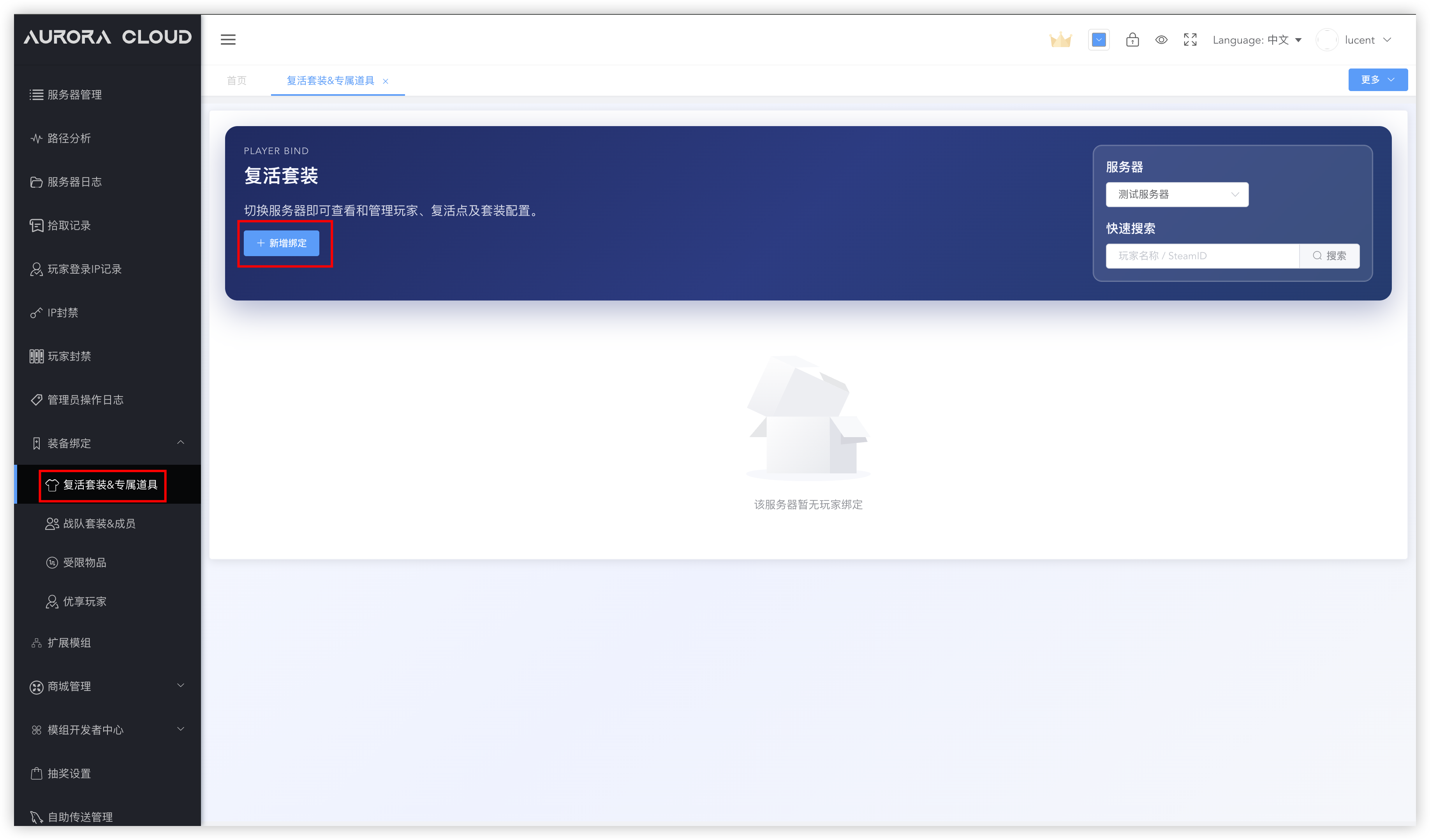
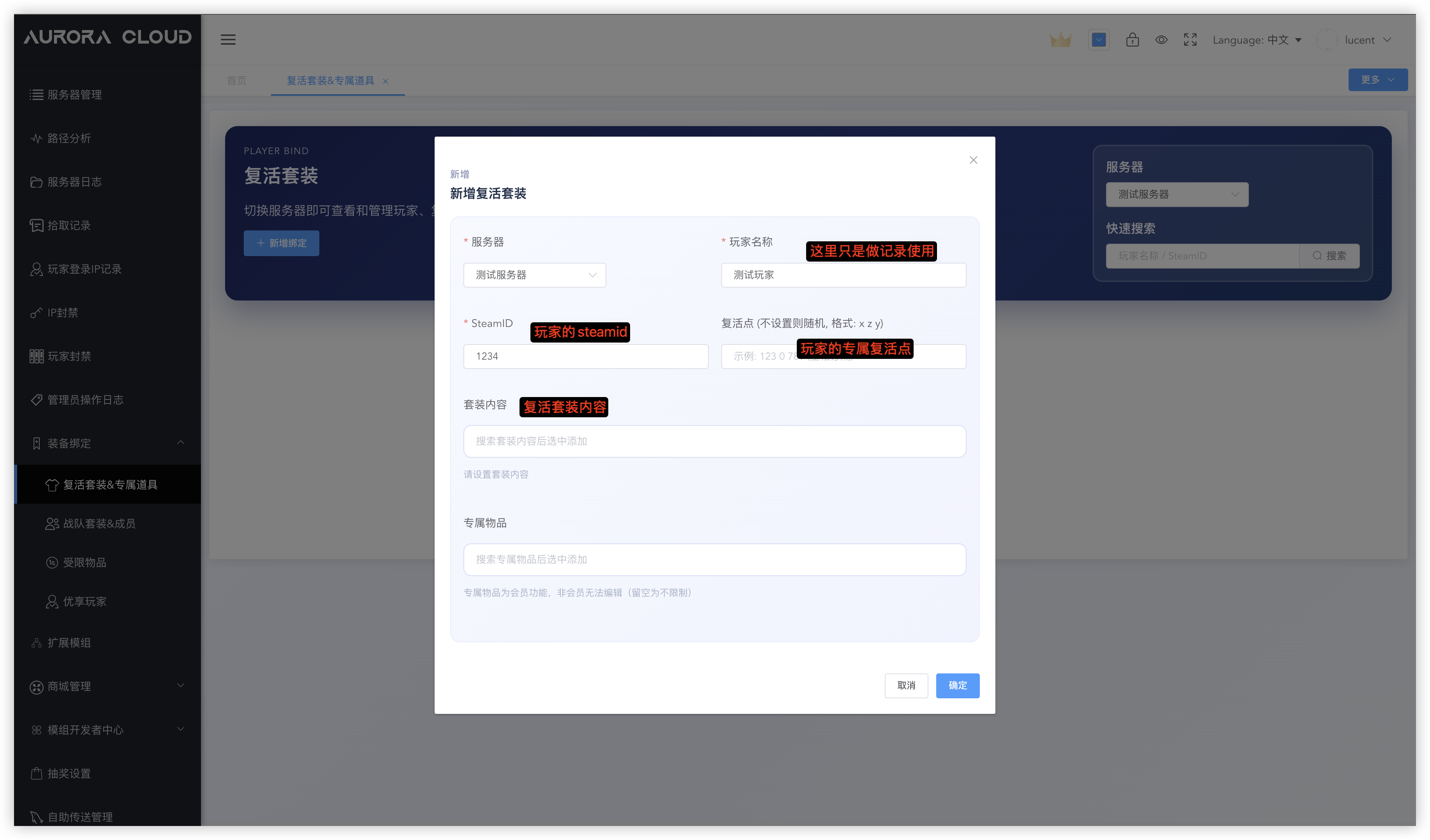 设置好后,最多30秒生效时间,玩家复活时就会按照你设置的内容出装备,复活点不指定就随机海边
专属物品
专属物品是某些道具可以指定只有某些玩家可以使用,其他玩家捡到会消失
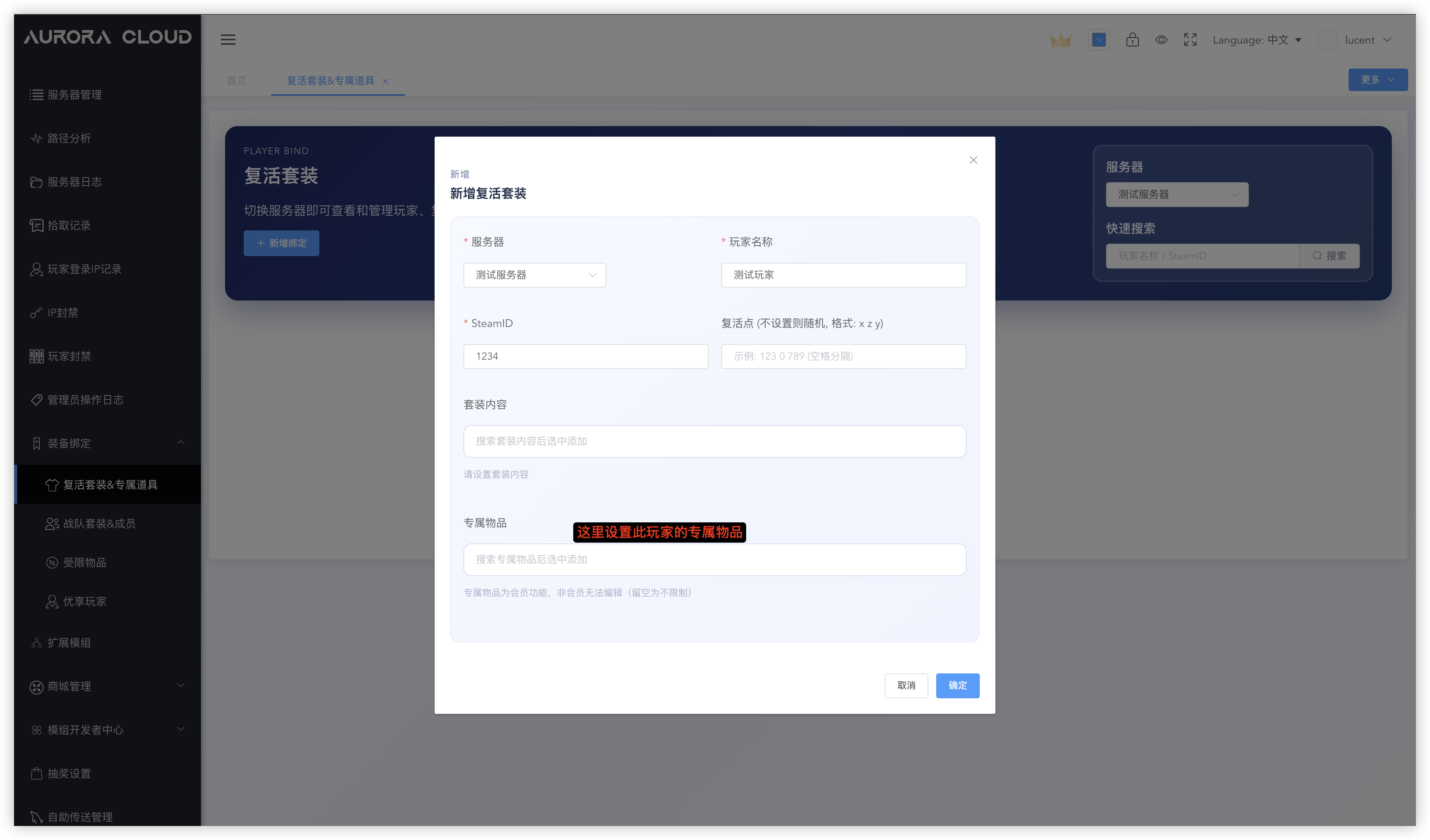 如果玩家A设置了M4A1为专属物品,那么其他玩家捡到就会自动消失
如果玩家B也设置了M4A1为专属物品,那么整个服务器就只有 玩家A和玩家B可以使用M4A1
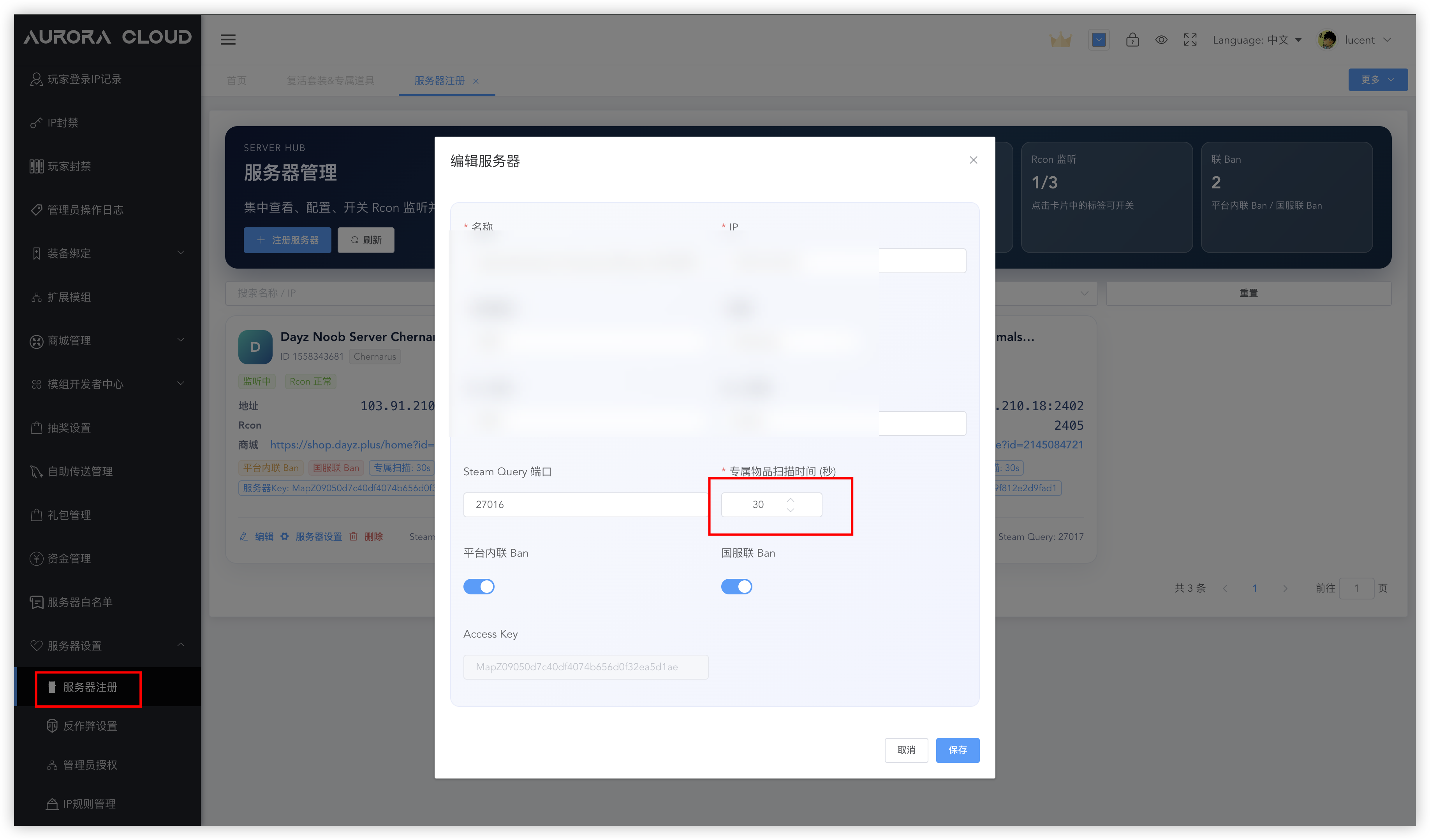
专属物品检测时间为30秒一次,如果想要修改,在这里改:
战队套装
如果你想要给某个小队统一出装,可以通过战队套装进行设置
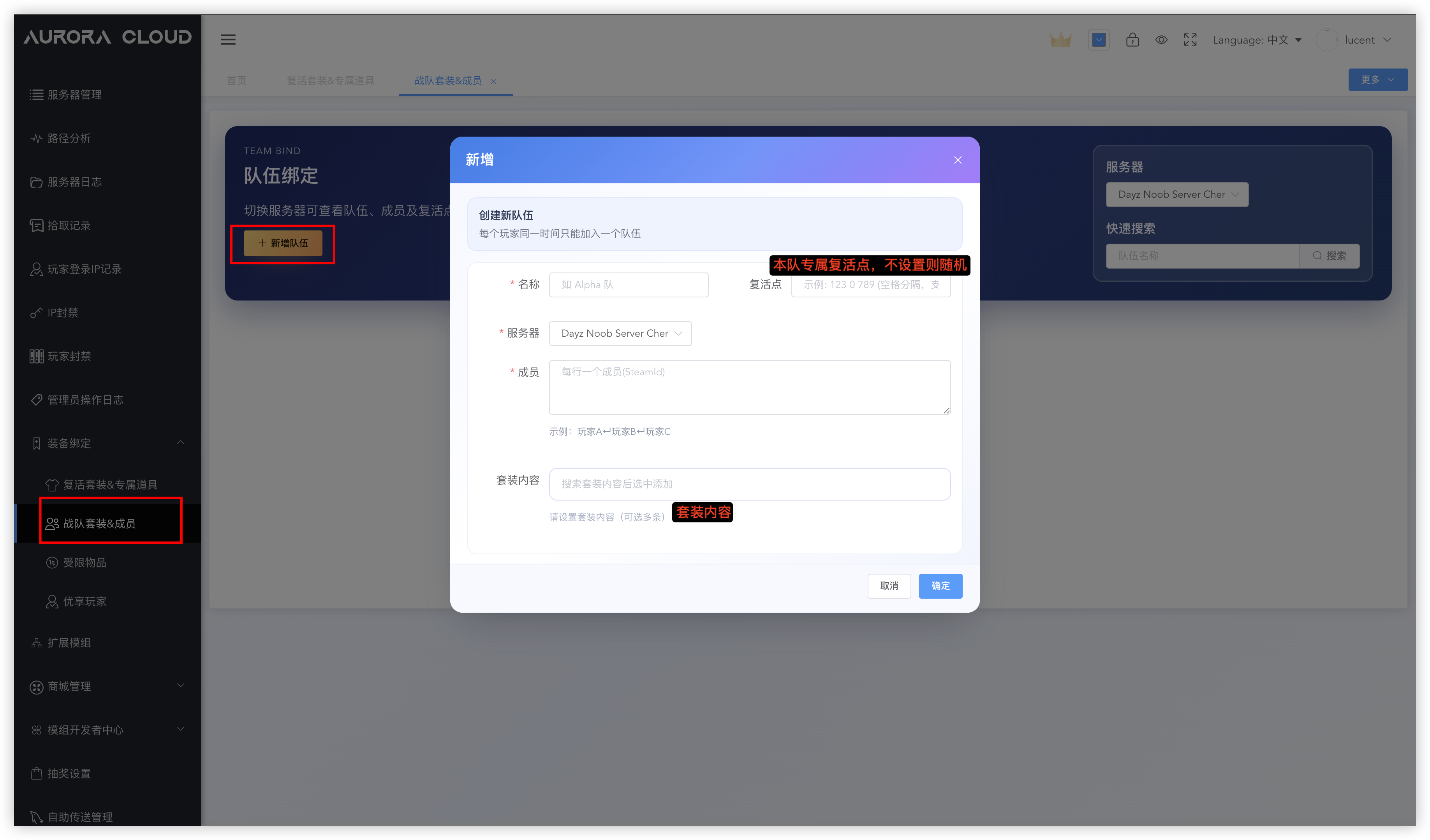 如果某个玩家即自己买了复活套装,又加入了一个有战队套装的小队,那么他复活时会得到两套装备
如果这个玩家自己也有专属复活点,战队也有,那么这时会以他的个人复活点为准
受限物品
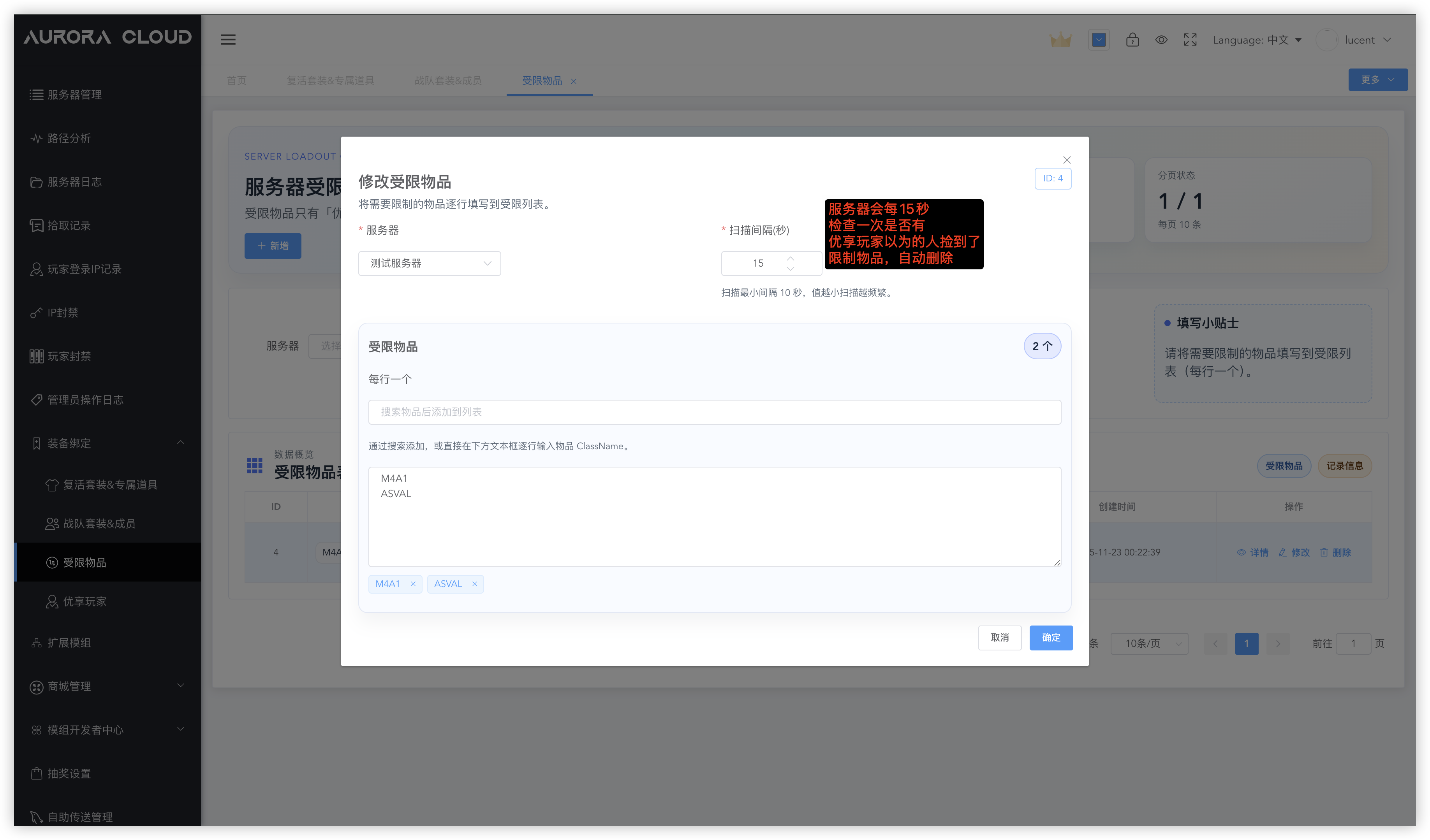
如果你想让一些道具只允许部分玩家使用,可以将其设置为受限物品
受限制的物品只有 优享玩家 才可以使用,其他玩家捡到会消失
优享玩家
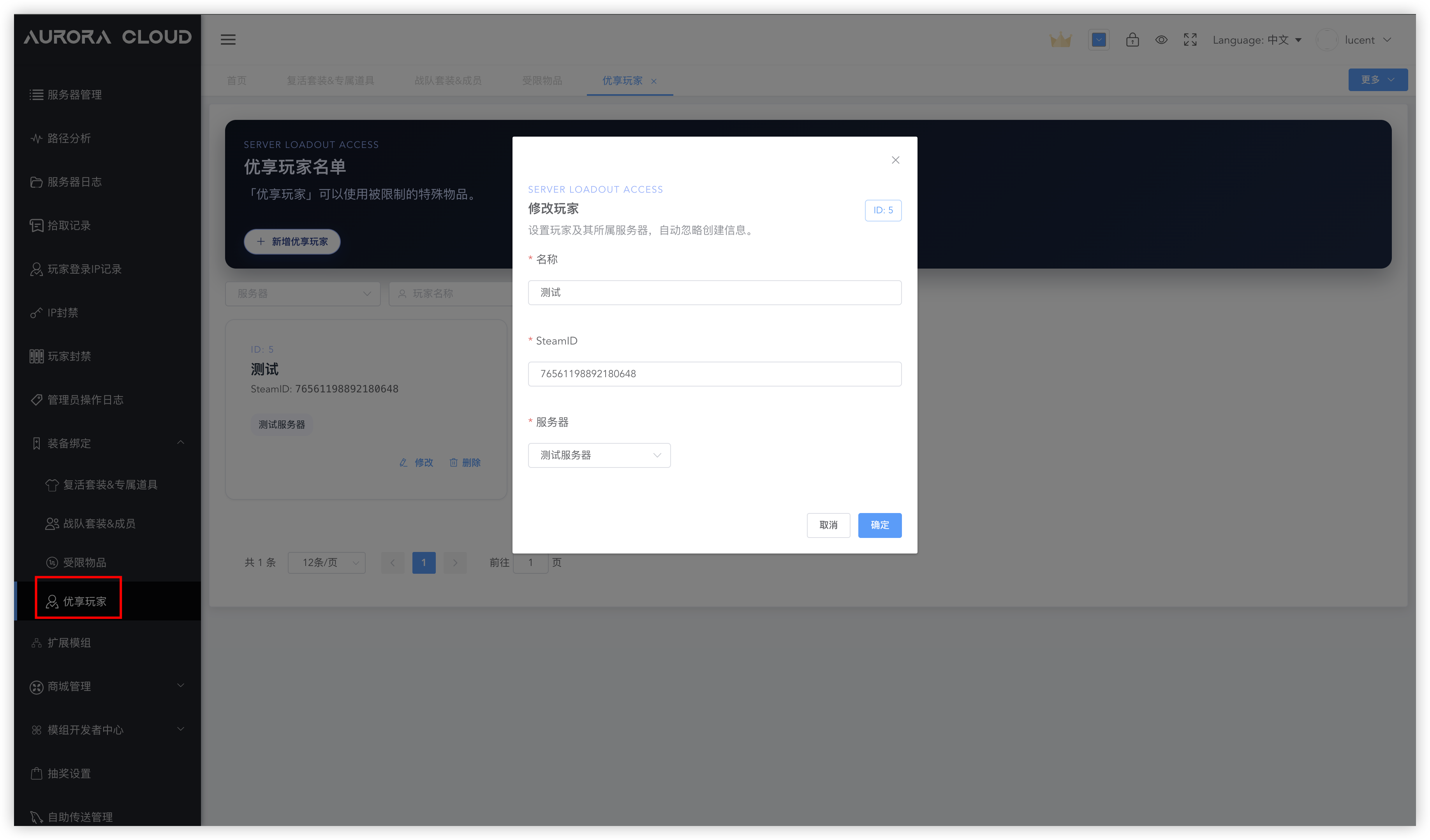
将玩家设置为优享玩家,可以使其能够使用受限物品
说明
专属物品优先级 > 受限物品优先级
某个物品成为玩家的专属物品后,即使在受限物品里设置了,优享玩家也不能使用
个人复活点的优先级 > 战队复活点